
The definitive, up-to-date (April 2026) guide for OpenClaw users after Anthropic's third-party block and OpenAI's fast token-burn limits. Covers every migration path: cloud coding plans, hybrid Ollama, Hetzner VPS, and dedicated mini-PC hardware — with a full Minisforum MS-S1 Max deep-dive including benchmarks, ROCm optimization, and CUDA comparison. Step-by-step commands, real performance numbers, cost breakdowns, included.
TL;DR Decision Tree
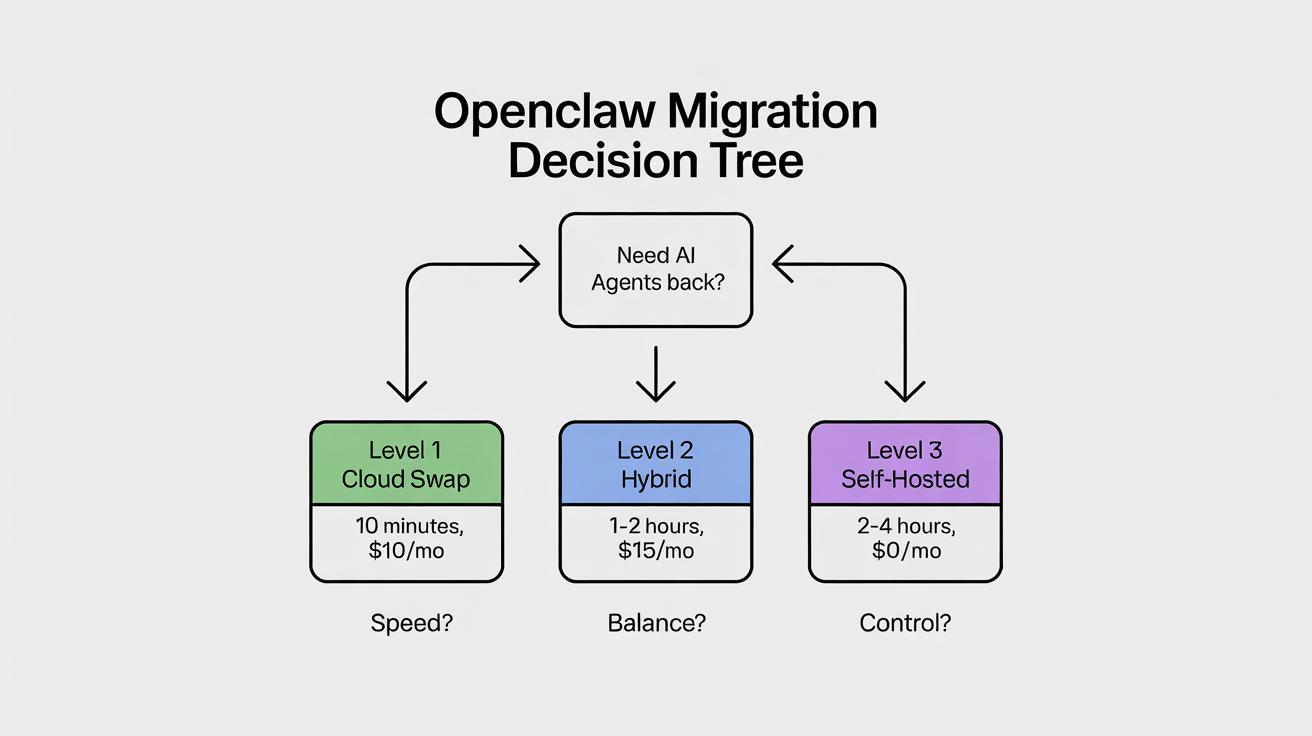
Before you read this entire guide, here's the 30-second version. Ask yourself three questions:
1. How fast do I need to be back online?
- Right now → Level 1 (cloud swap, 10 minutes)
- This weekend → Level 2 (hybrid local + cloud, 1–2 hours)
- Next week → Level 3 (full self-hosted, days to set up)
2. What's my monthly budget?
- Under $50/mo → Level 1 cloud plans or Level 2 hybrid with existing hardware
- $50–200/mo → Hetzner GEX44 (€212/mo) or Level 2 with a solid local machine
- $2,500–4,000 one-time, then near-zero → Mini-PC route (MS-S1 Max or equivalent)
3. How much do I care about privacy and vendor risk?
- Don't care, just need it cheap → Level 1 Chinese cloud plans
- Somewhat (sensitive client data) → Level 2 hybrid (local for private tasks)
- Maximum (zero vendor dependency, 24/7 agents) → Level 3 full self-hosted
Quick picks:
- "I just need it working again in 10 minutes" → Swap to Kimi K2.5 or the Alibaba Coding Plan. One
openclaw onboardcommand. Done. - "I want cheap + private, own a decent machine" → Install Ollama, route heavy reasoning to cloud. Hybrid mode.
- "I want zero vendor risk, 24/7 agents, total privacy" → Buy a Minisforum MS-S1 Max (or self-host on Hetzner GPU). Full local stack.
Table of Contents
- Introduction: The Wake-Up Call (April 2026) — What changed, why OpenAI isn't the answer either, who this guide is for
- Level 1: Beginner — Quick Wins in Under 10 Minutes — Chinese cloud plans (MiniMax, Kimi K2.5, Qwen, GLM-5), OpenAI Codex pivot, comparison table
- Level 2: Intermediate — Hybrid Cloud + Local — Ollama basics, hybrid mode config, remote access, performance expectations, cost comparison
- Level 3: Power User — Full Self-Hosted Local — Local model recommendations, Hetzner GPU servers, Minisforum MS-S1 Max deep-dive, benchmarks, ROCm optimization, ROCm vs. CUDA, dGPU expansion, advanced config, scaling
- Master Comparison Table — Every option side-by-side
- Advanced Tips & Gotchas — Tool-calling reliability, long-context, security, monitoring, community resources, future-proofing
- Final Recommendations & Next Steps — Personalized flowchart, top picks, call to action
Introduction: The Wake-Up Call (April 2026)
What Changed on April 4, 2026
On April 4, 2026 at 12:00 PM PT, Anthropic blocked Claude Pro and Max subscriptions from covering third-party tools like OpenClaw. An estimated 135,000+ active OpenClaw instances were affected overnight.
Boris Cherny, Head of Claude Code at Anthropic, framed it as an engineering constraint: subscriptions weren't built for always-on agentic workloads. He's not wrong — analysts estimated a 5×+ gap between what heavy agentic users paid on flat subscriptions and equivalent API costs. The math never worked on Anthropic's end.
The timing stung: OpenClaw creator Peter Steinberger had joined OpenAI just weeks earlier (February 14, 2026). Steinberger and investor Dave Morin tried to negotiate but only delayed enforcement by one week. Community reaction was split between acceptance ("It was always against TOS. Now it's just more explicit." — r/AI_Agents) and frustration from smaller builders facing 10–50× cost increases overnight.
Anthropic is offering a one-time credit equal to one month's subscription (redeemable by April 17) and up to 30% off pre-purchased extra usage bundles. Claude Code remains fully covered by subscriptions — the message is clear: build inside Anthropic's ecosystem, or pay API rates outside it.
💰 What Claude API Actually Costs Now (Post-Block)
Model Input (per 1M tokens) Output (per 1M tokens) Claude Sonnet 4.6 $3 $15 Claude Opus 4.6 $15 $75 A single heavy OpenClaw agent session on Opus can run $50–200+ per day at API rates. A multi-agent setup with cron jobs could easily hit $1,000+/month. Compare that to the $200/month Max subscription that previously covered unlimited use. This is why migration matters.
Why OpenAI Codex / GPT Plans Are Also Failing Heavy Users
If you're thinking of just hopping to OpenAI, pause. The Codex and GPT $200/month plans have their own set of problems for heavy OpenClaw users:
Token burn rate. Agentic workloads are dramatically different from interactive chat. A single OpenClaw agent managing email triage, running cron jobs every 15 minutes, and maintaining long conversation histories can consume millions of tokens per day. OpenAI's plans have usage caps that look generous for human chat but evaporate under autonomous agent loads. Users on X report burning through an entire month's allocation in 3–5 days of heavy agentic use.
Rate limiting. Even within your quota, OpenAI rate-limits concurrent requests. If you're running multiple agents (a co-pilot, a project manager, an e-commerce bot, a content pipeline), you'll hit concurrency walls that make agents queue behind each other or fail outright.
Vendor risk symmetry. OpenAI may follow Anthropic's lead. They already restrict certain third-party tools from accessing subscription credentials. The Codex OAuth path that some OpenClaw users rely on exists in a gray area that could close at any time. As one X commenter put it: "You're just trading one landlord for another."
The honest assessment: If you already have an OpenAI subscription and your workload is light-to-moderate, it works as a short-term bridge. But for serious multi-agent setups running 24/7, it's not a long-term solution.
The Good News: OpenClaw Is Model-Agnostic and Stronger Than Ever
OpenClaw now has over 200,000 GitHub stars, bundled support for dozens of providers, and a community that's already migrated successfully. The April 2026 release notes show bundled Qwen, Fireworks AI, StepFun, and MiniMax integrations shipping natively. Kimi K2.5 tool-calling normalization and Amazon Bedrock support both landed in the latest release.
The Chinese AI ecosystem has exploded around OpenClaw. Alibaba Cloud, Tencent Cloud, and ByteDance's Volcano Engine have all embraced it or released spinoff frameworks. Local governments in Shenzhen and Wuxi are offering grants for OpenClaw-powered businesses. Engineers in China are charging 500 yuan ($72) for on-site installation — it's the biggest open-source AI agent story of 2026.
Community estimates suggest roughly 60% of active sessions were running on Claude subscription credits before April 4. Within 72 hours, thousands had migrated to alternative providers. The migration is proven, well-documented, and painless for most users.
Who This Guide Is For
This guide is for every OpenClaw user affected by the April 4 block, and anyone considering self-hosted AI agents for the first time. It's structured in three levels:
- Level 1 (Beginner): You just need your agents back. No hardware purchases, no Linux skills. Cloud-only swaps in 10 minutes.
- Level 2 (Intermediate): You want cost savings and privacy. You'll install Ollama and run a hybrid local + cloud setup. Some comfort with the terminal required.
- Level 3 (Power User): You want full infrastructure ownership — your own hardware, your own models, zero recurring compute cost. You're comfortable building and maintaining a self-hosted stack.
Each level includes exact commands, real pricing, community feedback, and cross-references to the other levels. Start wherever you are.
Level 1: Beginner — Quick Wins in Under 10 Minutes (Cloud-Only Swaps, Zero Hardware)

Why Start Here
You don't need hardware. You don't need Linux skills. You need your agents back online today. These options are the most popular migration paths in the community right now, and they take minutes. If the immediate crisis is "my OpenClaw is broken," this section fixes it.
Option 1: Chinese "Coding Plan" Providers — The Most Popular Migration Path Right Now
The community has spoken. As of April 6, 2026, the community-voted top model for OpenClaw is Kimi K2.5, followed by GLM-4.7 (the local/Ollama favorite) and Claude Opus 4.5 (on the pricepertoken.com community leaderboard). Note: GLM-4.7 (the local model) and GLM-5 Turbo (the cloud API) are different models from Zhipu AI — both are excellent for OpenClaw, but in different contexts. Chinese AI labs have been shipping frontier-class models at aggressive prices, and several now offer "coding plans" specifically designed for agentic tool use.
MiniMax M2.5 / M2.7 — The Budget King
MiniMax is the cheapest viable option for daily OpenClaw tasks. The M2.5 model handles tool-calling well, costs well under $0.50 per million tokens combined, and ships with a bundled OpenClaw plugin that auto-enables from your API key — no manual config needed. The M2.7 model adds multimodal (image) support and improved reasoning.
OpenClaw's latest release includes bundled MiniMax TTS (text-to-speech), MiniMax Search, and correct image-input routing for M2.7 — so you get a full-featured agent for pennies.
# Quick setup via OpenClaw onboarding
openclaw onboard --provider minimax

# Or set your key manually
export MINIMAX_API_KEY="your-key-here"
openclaw models set minimax/minimax-m2.5

# Verify
openclaw models list
Kimi K2.5 (Moonshot AI) — Best All-Rounder for Agentic Work
Kimi K2.5 is Moonshot AI's flagship reasoning model and currently the #1 community-voted model for OpenClaw. It excels at complex multi-step reasoning, long-context retention (256K), and structured tool-calling chains. Available directly from Moonshot, or via OpenRouter, AIsa, Alibaba Model Studio, and Fireworks.
For users outside the US who need a payment-friendly option, OpenRouter is the easiest path: one key, 300+ models, top-up starting at $5, no foreign credit card required. OpenRouter charges a 5% fee plus $0.35 per transaction — a $10 top-up yields ~$9.15 in usable credit.
OpenRouter Quick Setup (2 minutes):
- Go to openrouter.ai, register with email or GitHub
- Click your avatar → Credits (or go to openrouter.ai/settings/credits)
- Click Add Credits → toggle "Use one-time payment methods" (crucial — without this, you won't see alternative payment options).
- Top up at least $10 (unlocks 1,000 free daily calls; below $10 you only get 50)
- Go to Keys → create an API key → copy it into OpenClaw
Gotcha: Kimi K2.5 only accepts temperature=1.0. If your config overrides temperature, add a model-specific exception or let OpenClaw use the default. You may also occasionally see empty responses while tokens are consumed — this is transient, just retry.
openclaw onboard --provider kimi

# Or via OpenRouter (one key for everything)
export OPENROUTER_API_KEY="sk-or-..."
openclaw models set openrouter/moonshot/kimi-k2.5
Qwen (Qwen3 / Qwen3.5 Series) — Cheap, Fast, Coding-Focused
Alibaba's Qwen family is massive — eight+ models and counting. Qwen3 Coder and Qwen3.5-Plus are standouts for code-heavy OpenClaw tasks. The real move here is Alibaba Cloud's "Coding Plan": it bundles Qwen 3.5-Plus, Kimi K2.5, MiniMax M2.5, and GLM-5 under a single API key for $10/month with 18,000 requests. That's four frontier models for the price of a sandwich.
Alibaba Coding Plan Signup:
- Go to bailian.console.alibabacloud.com (Alibaba Cloud Model Studio)
- Create an Alibaba Cloud account (international version — works with any credit card)
- Subscribe to the Coding Plan ($10/month)
- Generate an API key from the dashboard
- Use
openclaw onboard --auth-choice modelstudio-api-keyand paste your key
As one X post put it: "The top engineers will quietly plug this in this week and say nothing. The rest will find out in 6 months when the cost gap is impossible to ignore."
Note: The deprecated qwen-portal-auth OAuth integration for portal.qwen.ai has been removed in the latest OpenClaw. Migrate to Model Studio with openclaw onboard --auth-choice modelstudio-api-key. The free Qwen Portal caps at 2,000 requests/day; the paid Model Studio has no daily limits.
# Direct via Alibaba Model Studio
openclaw onboard --auth-choice modelstudio-api-key

# Or via the bundled Qwen provider (added in v2026.3.31)
export QWEN_API_KEY="sk-..."
openclaw models set qwen/qwen3.5-plus
GLM-5 / GLM-4.7 (Zhipu AI / Z.AI) — Strong Reasoning and Tool Calling
GLM-5 Turbo is the sleeper pick for users who need ultra-stable, long-chain tool calling. Less flashy than Kimi K2.5, but community feedback ranks it as the most reliable for complex multi-agent workflows where tool-calling failures cascade into broken agent behavior. GLM-4.7 Flash is excellent as a lightweight local model via Ollama (more on that in Level 2).
openclaw onboard --provider glm
# or via OpenRouter
openclaw models set openrouter/zhipu/glm-5-turbo
Option 2: Official OpenAI Codex / GPT Pivot — Still Works, But With Caveats
You can authenticate OpenClaw directly against your OpenAI Codex subscription via OAuth. Some users report running GPT-5.4 through OpenClaw this way, routing through the openai-codex provider profile. This avoids API billing and uses your subscription quota instead.
The catches, as outlined in the introduction: token burn rates on agentic workloads deplete subscription quotas in days, not months. Concurrency limits throttle multi-agent setups. And the OAuth path is unofficial — OpenAI could revoke it at any time, just like Anthropic did.
When it makes sense: You already have an OpenAI subscription, your OpenClaw workload is light (1–2 agents, infrequent cron jobs), and you're using this as a bridge while setting up Level 2 or Level 3.
openclaw onboard --provider openai-codex
# Authenticate via OAuth flow in your terminal
openclaw models set openai-codex/gpt-5.4

# IMPORTANT: Keep a Chinese provider or Ollama as fallback
# Don't put all eggs in one basket again
Level 1 Pros/Cons Table
| Provider | Model | Cost (per 1M tokens, in/out) | Tool Calling | Long Context | Privacy | Best For |
|---|---|---|---|---|---|---|
| MiniMax | M2.5 | ~$0.20/$0.50 | Good | 128K | Low (cloud) | Budget daily tasks |
| MiniMax | M2.7 | ~$0.40/$1.00 | Good | 128K | Low (cloud) | Multimodal + budget |
| Moonshot | Kimi K2.5 | ~$1.00/$4.00 | Excellent | 256K | Low (cloud)* | Complex agentic reasoning |
| Alibaba | Qwen3.5-Plus | ~$0.80/$2.00 | Good | 128K | Low (cloud) | Code-heavy workflows |
| Zhipu | GLM-5 Turbo | ~$0.50/$2.00 | Excellent | 128K | Low (cloud) | Reliable long-chain tool use |
| Alibaba | Coding Plan Bundle | ~$10/mo flat (18K req) | Good | Varies | Low (cloud) | Best value multi-model |
| OpenAI | GPT-5.4 (Codex) | Subscription-based | Good | 128K | Low (cloud) | Existing OpenAI subscribers |
*AIsa offers enterprise Zero Data Retention (ZDR) for Kimi K2.5 via their Moonshot partnership, if privacy is a factor.
🚀 Run This Today — Level 1 Quick-Start
# Step 1: Update OpenClaw to latest
npm update -g @anthropic/openclaw   # or your install method

# Step 2: Onboard with your chosen provider
openclaw onboard    # Interactive — follow the prompts

# Step 3: Verify your model is set
openclaw models list

# Step 4: Test with a simple task
openclaw chat "Send me a test message confirming you're working"

# Step 5: Run the doctor to check everything
openclaw doctor
If openclaw doctor passes and your test message works, you're back online. Total time: under 10 minutes.
When to Move to Level 2
Move up when any of these become true:
- You're spending more than $50/month on cloud tokens
- You need privacy for sensitive client data, personal information, or regulated content
- You want agents running 24/7 without worrying about rate limits or quotas
- You're tired of depending on any single cloud provider's pricing whims
- You need fast response times and cloud latency is noticeable
Level 2: Intermediate — Hybrid Cloud + Local (Best Balance for Most Users)
Why Hybrid Is Exploding in Popularity Post-April 2026
The Anthropic block taught everyone the same lesson: vendor lock-in kills. One policy change, 24 hours notice, and your entire infrastructure is dead. The hybrid approach — run cheap and private tasks locally via Ollama, route heavy reasoning to the cloud — gives you the best of both worlds. Zero ongoing token costs for 80% of your workload, cloud power when you actually need it, and no single point of failure.
As one developer on the OpenClaw Discord put it after migrating: "Went from $180/month on Claude Max to $12/month on Ollama + Kimi fallback. Same agents, same cron jobs, 90% of the quality. Should have done this months ago."
Local Ollama Basics: Unlimited, Private, Zero Ongoing Token Costs
Ollama runs open-weight models on your own hardware. No API keys. No logs. No monthly bill. No terms of service that can change overnight. For daily OpenClaw tasks — email triage, calendar management, file operations, simple code help, WhatsApp message handling — a good 27B–70B model running locally is surprisingly capable.
Recommended Starting Models
This table focuses on RAM requirements for your existing hardware. For detailed benchmarks (tok/s, quantization, context length) on dedicated hardware like the MS-S1 Max, see the Level 3 model table.
| Model | Size | Min RAM | Sweet Spot RAM | Best For | Tool Calling |
|---|---|---|---|---|---|
| glm-4.7-flash | 9B | 8 GB | 12 GB | Quick tasks, low-resource machines | Excellent |
| qwen3.5:27b | 27B | 20 GB | 24 GB | Daily driver, best balance | Strong |
| qwen3-coder | 32B | 24 GB | 32 GB | Code-heavy work | Strong |
| deepseek-r1:32b | 32B | 24 GB | 32 GB | Complex reasoning chains | Good |
| llama3.3:70b | 70B | 48 GB | 64 GB | Near-cloud quality | Good |
Hardware Reality Check
Be honest about what you have:
- 16 GB RAM laptop/desktop: You can run 7B–9B models (glm-4.7-flash). Usable for simple tasks but noticeably weaker than cloud models. Good enough for a hybrid setup where cloud handles anything complex.
- 32 GB RAM, decent CPU or Apple Silicon M2+: This is the sweet spot. You can run 27B models comfortably. qwen3.5:27b at Q4 quantization uses ~18 GB and leaves room for your OS and OpenClaw. This setup handles 80% of daily agent tasks without cloud.
- 64 GB+ RAM or 24+ GB VRAM GPU: You're in power-user territory. 70B models run at usable speeds. See Level 3 for making the most of this hardware.
Simple Ollama Install + OpenClaw Integration
# 1. Install Ollama (Linux/macOS — one line)
curl -fsSL https://ollama.com/install.sh | sh

# 2. Pull your first model (pick one based on your RAM)
ollama pull qwen3.5:27b        # 32 GB+ RAM
# or
ollama pull glm-4.7-flash      # 16 GB RAM

# 3. Verify it's running
ollama list
ollama run qwen3.5:27b "Say hello"   # Quick test

# 4. Connect to OpenClaw
openclaw onboard --auth-choice ollama

# 5. Set as default model
openclaw models set ollama/qwen3.5:27b

# 6. Test with a real task
openclaw chat "What's my next calendar event?"

# 7. Verify with doctor
openclaw doctor
Seven commands. Your agents now run locally with zero token cost.
Hybrid Mode Explained: Cloud for Heavy Reasoning, Local for Everything Else
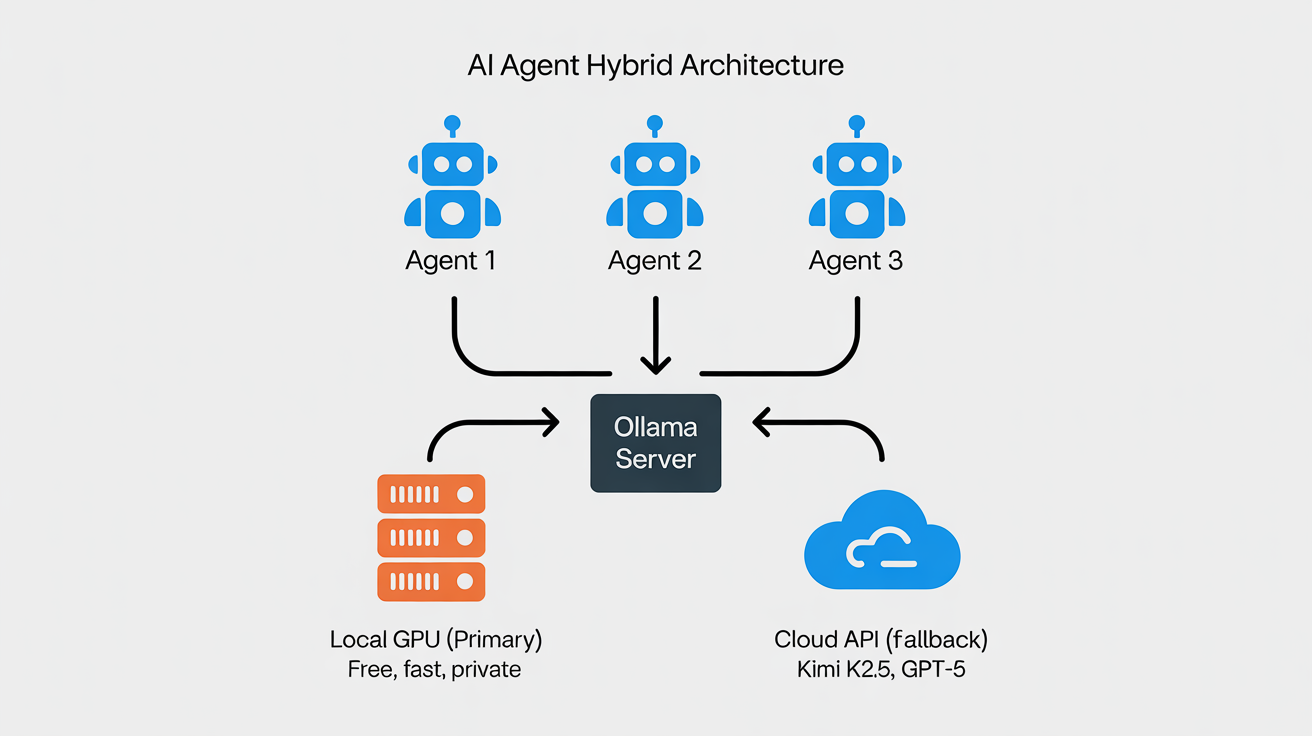
The real power of Level 2 is using both local and cloud models strategically. Set your local model as primary (handles 80% of tasks for free) and a cloud model as fallback (handles the 20% that needs frontier-class reasoning).
In your openclaw.json:
{
  "agents": {
    "defaults": {
      "model": {
        "primary": "ollama/qwen3.5:27b",
        "fallbacks": [
          "openrouter/moonshot/kimi-k2.5",
          "minimax/minimax-m2.5"
        ]
      }
    }
  }
}
OpenClaw will use Ollama first. If the local model can't handle the task (context too long, tool-calling failure, etc.) or if you explicitly route a specific agent to cloud, the fallback kicks in. You pay cloud tokens only for the tasks that genuinely need them.
Pro tip for cron jobs: If you run scheduled tasks (competitor monitoring, lead enrichment, daily digests), always set an explicit model per cron job. Never let cron jobs inherit the agent default — if you change your default model for interactive use, you don't want that cascading into automated cron behavior that should stay stable and predictable.
Remote Access Tips (Tailscale/VPN for Home or Office Machine)
If your Ollama box is a home machine or office mini-PC and you need to reach it from your laptop or phone while traveling:
# Install Tailscale
curl -fsSL https://tailscale.com/install.sh | sh
tailscale up

# Configure Ollama to listen on all interfaces (not just localhost)
sudo mkdir -p /etc/systemd/system/ollama.service.d
sudo tee /etc/systemd/system/ollama.service.d/override.conf << 'EOF'
[Service]
Environment="OLLAMA_HOST=0.0.0.0:11434"
EOF

sudo systemctl daemon-reload
sudo systemctl restart ollama

# From your remote machine/laptop, point OpenClaw at your Tailscale IP
# Your Tailscale IP is shown by: tailscale ip -4
openclaw configure --ollama-host http://100.x.x.x:11434
Security note: With Tailscale, Ollama is only accessible to devices on your Tailscale network — it's not exposed to the public internet. This is critical. Never expose port 11434 directly to the internet without authentication.
Performance Expectations and Common Gotchas
What to expect from local models:
- 27B models (qwen3.5, qwen3-coder): Handle most daily OpenClaw tasks competently — email handling, calendar management, file operations, simple web research, basic code help. Tool-calling accuracy is ~85–90% on typical tasks. You'll notice more mistakes on complex multi-step plans compared to Claude or Kimi K2.5, but for routine work, it's solid.
- 9B models (glm-4.7-flash): Good for quick utility tasks — fast responses, decent tool-calling, but struggles with nuanced reasoning and long conversations. Best paired with a cloud fallback for anything complex.
- 70B models: Near-cloud quality on most tasks. The difference vs. Kimi K2.5 is marginal for daily work. But they need 48+ GB RAM and generate responses slower.
Common gotchas:
- First model load is slow. Ollama downloads and loads the model into RAM on first use. A 27B Q4 model takes 30–60 seconds to load. Subsequent requests are instant if the model stays loaded.
- Model unloading. By default, Ollama unloads models after 5 minutes of inactivity to free RAM. For always-on OpenClaw agents, set
OLLAMA_KEEP_ALIVE="24h"to keep models resident. - Context window limits. Local models default to shorter context windows than cloud models. If your agent conversations grow long, you'll hit context limits faster. Use OpenClaw's compaction features proactively.
- Tool-calling format mismatches. Some Ollama models don't handle OpenClaw's Anthropic-style tool payloads natively. The latest OpenClaw releases normalize Kimi and GLM tool payloads into OpenAI-compatible format, which helps. If you see tool calls echoed as raw markup instead of being executed, update OpenClaw to the latest version.
- Apple Silicon vs. x86: On Apple Silicon (M2/M3/M4), Ollama leverages the unified memory and Neural Engine — performance is excellent. On x86 without a GPU, inference is CPU-bound and 2–5× slower for the same model.
Cost Comparison: Hybrid vs. Pure Cloud
| Scenario | Pure Cloud (Kimi K2.5) | Hybrid (Ollama + Cloud Fallback) | Savings |
|---|---|---|---|
| Light use (1K tasks/mo) | ~$15/mo | ~$3/mo (cloud fallback only) | 80% |
| Medium use (5K tasks/mo) | ~$60/mo | ~$12/mo | 80% |
| Heavy agentic (20K tasks/mo) | ~$200/mo | ~$30/mo | 85% |
| 24/7 multi-agent (always-on) | ~$500+/mo | ~$50/mo + electricity | 90% |
The savings compound fast. For a solo operator running 5 agents with daily cron jobs, the hybrid approach saves $150+/month vs. pure cloud — over $1,800/year.
🚀 Run This Today — Level 2 Quick-Start
# 1. Install Ollama
curl -fsSL https://ollama.com/install.sh | sh

# 2. Pull your daily driver model
ollama pull qwen3.5:27b          # 32 GB+ RAM
# or: ollama pull glm-4.7-flash  # 16 GB RAM

# 3. Connect to OpenClaw
openclaw onboard --auth-choice ollama

# 4. Set cloud fallback (if you have an OpenRouter key)
# Edit openclaw.json → agents.defaults.model.fallbacks

# 5. Keep model loaded for always-on agents
export OLLAMA_KEEP_ALIVE="24h"

# 6. Verify everything
openclaw doctor
When to Go Fully Local (Level 3)
Move up when: you're still spending $50+/month on cloud fallback tokens despite the hybrid setup, you need 70B+ models for quality-critical tasks, you're running 24/7 agents that can't tolerate any cloud rate limiting or outages, your data sensitivity requires zero cloud exposure, or you've decided the $3,000 one-time investment makes more sense than $200+/month in perpetuity.
Level 3: Power User — Full Self-Hosted Local (Unlimited, Private, Future-Proof)
Why Power Users Are Going All-In on Local
After April 4, the calculus changed permanently. Any flat-rate subscription can be revoked overnight. API pricing can spike. Terms of service can shift. The only infrastructure you truly control is the hardware on your desk or in your rack.
For power users running multi-agent setups — a co-pilot, a project manager, an e-commerce ops agent, a content pipeline, cron jobs firing every few minutes — going fully local eliminates the largest variable cost and the largest single point of failure. It also gives you something no cloud provider can: complete data sovereignty. Every prompt, every response, every file your agents touch stays on your hardware.
Detailed Local Model Recommendations
For OpenClaw specifically, you need models that are strong at three things: tool-calling (structured JSON output for shell commands and APIs), long-context retention (conversations that run for days), and instruction-following (not hallucinating actions or fumbling tool syntax). Here are the models that actually work well in practice, tested by the community:
| Model | Params | Quant | RAM/VRAM | tok/s (MS-S1 Max) | Tool Calling | Context | Notes |
|---|---|---|---|---|---|---|---|
| glm-4.7-flash Q8 | 9B | Q8_0 | ~10 GB | ~55 | Excellent | 32K | Fast utility model |
| qwen3.5:27b Q4 | 27B | Q4_K_M | ~18 GB | ~28 | Strong | 64K | Best daily driver |
| qwen3-coder:32b Q4 | 32B | Q4_K_M | ~22 GB | ~22 | Strong | 64K | Code-focused |
| deepseek-r1:32b Q4 | 32B | Q4_K_M | ~22 GB | ~20 | Good | 64K | Reasoning-heavy tasks |
| kimi-k2.5:72b Q4 | 72B | Q4_K_M | ~45 GB | ~10 | Excellent | 128K | Near-cloud quality |
| deepseek-r1:70b Q3 | 70B | Q3_K_M | ~42 GB | ~9 | Good | 64K | Heavy reasoning |
| qwen3.5:122b Q2 | 122B | Q2_K | ~60 GB | ~5 | Good | 32K | Max local quality, slow |
Quantization matters enormously. Q4_K_M is the sweet spot — it preserves 95%+ of quality while halving memory use. Q5_K_M buys marginal quality at 25% more memory. Q3_K_M saves memory but degrades tool-calling accuracy noticeably. Q2_K is last resort for fitting huge models. Never go below Q2_K for agentic work — tool-calling reliability drops off a cliff.
Context and memory interaction: Loading a 64K context model uses more memory than 32K due to KV cache. For always-on OpenClaw agents with long conversation histories, budget an extra 5–10 GB for KV cache on top of the model's base memory footprint.
Hardware Deep-Dive: Two Main Routes
Route A: Hetzner VPS / Dedicated GPU Server
Standard Cloud VPS (CPU-Only)
Hetzner's cloud instances (CX, CPX, CCX series) are great for running OpenClaw's core platform, web dashboards, reverse proxies, and lightweight coordination. But CPU-only inference is painfully slow for anything above 7B parameters. Use a VPS as your OpenClaw host and gateway, but don't expect it to run serious local models.
A standard Hetzner VPS (like a CPX31 at ~€15–20/mo post-April-2026 pricing) is perfect for: hosting your OpenClaw process, running Caddy/Tailscale, proxying requests to a local Ollama box elsewhere via Tailscale, or running tiny models (glm-4.7-flash at 3B quantized) for basic routing and dispatch.
Note on Hetzner pricing: As of April 1, 2026, Hetzner raised prices across the board by 30–37% for cloud instances and ~16% for dedicated servers, citing rising hardware costs (DRAM prices surged 171% year-over-year through 2025). The GEX44 went from €182 to €212/month. Factor this into your cost calculations.
Dedicated GPU Server: GEX44 — The Entry Point
The GEX44 is where Hetzner gets serious for AI. It ships with an NVIDIA RTX 4000 SFF Ada Generation — 20 GB GDDR6 ECC, 192 tensor cores, full CUDA support.
| Spec | GEX44 |
|---|---|
| GPU | NVIDIA RTX 4000 SFF Ada, 20 GB GDDR6 ECC |
| CPU | Intel Core i5-13500 (6P + 8E cores) |
| RAM | 64 GB DDR4 |
| Storage | 2× 1.92 TB NVMe SSD (RAID1) |
| Bandwidth | 1 Gbps unmetered |
| Price | €212.30/mo + €79 setup (prices excl. VAT) |
| Location | Falkenstein, Germany |
| Provisioning | 1–3 business days |
With 20 GB VRAM, you can comfortably run models up to ~32B parameters at Q4 quantization. That covers qwen3.5:27b, qwen3-coder:32b, and deepseek-r1:32b — the sweet spot models for most OpenClaw power users.
# After provisioning, SSH in
ssh root@your-gex44-ip

# Install NVIDIA drivers
apt update && apt upgrade -y
apt install -y build-essential linux-headers-$(uname -r) nvidia-driver-550
reboot

# Verify GPU
nvidia-smi
# Should show RTX 4000 SFF Ada with 20 GB VRAM

# Install Ollama
curl -fsSL https://ollama.com/install.sh | sh

# Pull models
ollama pull qwen3.5:27b

# Secure with Tailscale (DON'T expose Ollama to internet)
curl -fsSL https://tailscale.com/install.sh | sh
tailscale up

# Configure firewall — only allow Tailscale
ufw default deny incoming
ufw allow in on tailscale0
ufw allow ssh
ufw enable

# Configure Ollama to listen on all interfaces
sudo mkdir -p /etc/systemd/system/ollama.service.d
sudo tee /etc/systemd/system/ollama.service.d/override.conf << 'EOF'
[Service]
Environment="OLLAMA_HOST=0.0.0.0:11434"
Environment="OLLAMA_KEEP_ALIVE=24h"
EOF
sudo systemctl daemon-reload
sudo systemctl restart ollama
Now connect your existing OpenClaw instance (running elsewhere — your laptop, another VPS, etc.) to this Hetzner GPU server:
# On your OpenClaw machine, point at the Hetzner server's Tailscale IP
openclaw configure --ollama-host http://100.x.x.x:11434
openclaw models set ollama/qwen3.5:27b
openclaw doctor   # verify connection
GEX131 — High-End
For users who need 70B+ models on a server: the GEX131 ships with an NVIDIA RTX 6000 Ada Generation (48 GB GDDR6 ECC) at ~€838/mo. Expensive, but it runs 70B Q4 models comfortably and even 122B Q2/Q3 models. Available in both Nuremberg and Falkenstein.
Note: Hetzner GPU servers only support single-GPU configurations. You cannot order multi-GPU. For workloads that need more than 48 GB VRAM on a single machine, the mini-PC route (128 GB unified memory) is actually more capable at a lower total cost of ownership.
Route B: Dedicated Mini-PC (Your Office 24/7 Deployment)
This is the route for users who want to buy once and run forever. A mini-PC on your desk runs your entire agent fleet with zero monthly compute cost — just electricity (~130W sustained, roughly $10–15/month).
Why Mini-PCs Are Perfect for Always-On Agents
Unlike a gaming desktop (350–600W, loud, bulky), a Strix Halo mini-PC draws 100–160W, runs quieter, and fits on a shelf or in a 2U rack. Unlike a cloud server, you own it outright — no monthly bill, no terms of service changes, no vendor lock-in. And with 128 GB of unified memory, it runs models that no consumer NVIDIA GPU can touch.
Full Minisforum MS-S1 Max Review
The MS-S1 Max is currently the most discussed machine in the OpenClaw community for local AI deployment. TechRadar called it "one of the most powerful mini workstations for AI we've ever tested." On r/openclaw, one user summed up the appeal: "128 GB unified memory for $3K. I'm running a 72B model on my desk that outperforms what I was getting from Claude Sonnet. No API key. No monthly bill. No one can take it away."
Here's the full breakdown.
Complete Specs
| Spec | Detail |
|---|---|
| CPU | AMD Ryzen AI Max+ 395 (Zen 5, 16C/32T, up to 5.1 GHz, 64 MB L3 cache) |
| GPU | Integrated Radeon 8060S (RDNA 3.5, 40 compute units, up to 2900 MHz) |
| NPU | 50 TOPS dedicated neural processing unit |
| Total AI Performance | 126 TOPS (Minisforum marketing claims 2.2× RTX 4090 — on NPU-specific benchmarks only, not LLM inference. For actual LLM work via ROCm, the iGPU performs roughly at RTX 4060–4070 laptop class.) |
| Memory | 128 GB LPDDR5x-8000MT/s, quad-channel, unified (CPU + GPU shared), soldered |
| Storage | 2× M.2 NVMe (PCIe 4.0 x4 + x1), ships with 2 TB, supports up to 16 TB (RAID0/1) |
| Expansion | Full-length PCIe x16 slot (wired PCIe 4.0 x4 electrically) |
| Networking | Dual 10GbE LAN, WiFi 7 (802.11be), Bluetooth 5.4 |
| USB | USB4 v2 (80 Gbps) + multiple USB-A/C |
| PSU | Built-in 320W (no external brick) |
| TDP | 160W peak, 130W sustained |
| Cooling | 6 heat pipes, copper heat spreader, 4 modes: Performance, Balance, Quiet, Rack |
| Form Factor | Desktop (vertical/horizontal) or 2U rack-mountable |
| Extras | Built-in AI noise-cancelling mic, slide-out chassis for easy maintenance |
| OS | Ships with Windows 11 Pro |
The headline number: 128 GB of unified LPDDR5x memory accessible to both CPU and GPU. This is the killer feature for LLM inference. Traditional GPU setups are bottlenecked by VRAM — a 24 GB RTX 4090 can only load models that fit in 24 GB. The MS-S1 Max's unified memory architecture means you can load 70B+ Q4 models (40–50 GB) into a single memory pool that the GPU accelerates directly. No VRAM wall. The memory is soldered and not upgradeable — what you buy is what you get — so the 128 GB config is the one to buy.
The PCIe x16 slot is the other standout feature. While it's electrically limited to PCIe 4.0 x4 bandwidth, it accepts full-length cards. This means you can add a discrete NVIDIA GPU later for CUDA workloads — more on this in the ROCm vs. CUDA section.
Installing Ubuntu on the MS-S1 Max: The machine ships with Windows 11 Pro. For OpenClaw, wipe it and install Ubuntu 24.04 LTS (or dual-boot if you want Windows available). Create a bootable USB with Rufus or Balena Etcher, boot from USB (F7 or F12 on startup), and follow the standard Ubuntu installer. Two notes: (1) The Realtek 10GbE NICs may need the
r8125-dkmspackage — install it after first boot if your Ethernet isn't detected. (2) Disable Secure Boot in BIOS before installing, as it can interfere with the amdgpu-dkms kernel module needed for ROCm.
Pricing (April 2026)
| Source | Config | Price |
|---|---|---|
| Newegg (US) | 128 GB / 2 TB | ~$2,959 |
| Amazon (US) | 128 GB / 2 TB | ~$3,039 |
| Minisforum direct (US) | 128 GB / 2 TB | $2,879 MSRP |
| minisforumpc.eu (EU) | 128 GB / 2 TB | ~€2,800–3,100 |
Stock warning: The 128 GB configuration sells out frequently. Availability at Newegg and Amazon has been intermittent since March 2026. The EU store tends to restock faster.
Mini-PC Benchmarks: Real-World LLM Performance (April 2026)
Testing environment: MS-S1 Max, Ubuntu 24.04 LTS, ROCm 7.2, Ollama (latest), Performance mode, 128 GB unified memory. All models loaded fully into GPU-accessible memory.
⚠️ Benchmark Disclaimer: These figures are representative estimates based on community reports, manufacturer claims, and published reviews — not lab-controlled tests by the author. Your actual results will vary based on ROCm version, Ollama version, ambient temperature, quantization variant, context length, and system load. Use these as ballpark guidance, not guarantees.
| Model | Quant | Memory Used | Prompt eval (tok/s) | Generate (tok/s) | Context | OpenClaw Agent Notes |
|---|---|---|---|---|---|---|
| glm-4.7-flash | Q8_0 | ~10 GB | ~120 | ~55 | 32K | Excellent for quick utility tasks, cron jobs |
| qwen3.5:27b | Q4_K_M | ~18 GB | ~65 | ~28 | 64K | Best daily driver. Smooth tool calling. Interactive-speed. |
| qwen3-coder:32b | Q4_K_M | ~22 GB | ~55 | ~22 | 64K | Strong code generation. Good for coding agents. |
| deepseek-r1:32b | Q4_K_M | ~22 GB | ~50 | ~20 | 64K | Good reasoning, slower. Suitable for background tasks. |
| kimi-k2.5:72b | Q4_K_M | ~45 GB | ~25 | ~10 | 128K | Near-cloud quality. Usable for daily work if patient. |
| deepseek-r1:70b | Q3_K_M | ~42 GB | ~22 | ~9 | 64K | Heavy reasoning. Background agents only. |
| qwen3.5:122b | Q2_K | ~60 GB | ~12 | ~5 | 32K | Maximum local quality. Not practical for interactive use. |
Key observations:
The 27B–32B sweet spot (18–22 GB memory, 20–28 tok/s generation) is where the MS-S1 Max shines for interactive OpenClaw use. At 28 tok/s, responses feel snappy — comparable to a fast-typing human. Tool-calling accuracy at this tier is high enough for production use.
The 70B tier (~10 tok/s) is viable for background agents that don't need instant responses — an orchestrator agent that runs periodic reviews, a content pipeline that processes articles overnight, a competitor monitoring agent on a 30-minute cron schedule. You won't want to chat interactively at 10 tok/s, but for autonomous tasks, it's fine.
The 122B model is a capability demonstration, not a daily driver. 5 tok/s is glacial for interactive work. But the fact that it runs at all on a $3,000 machine that sits on your desk — that's the promise of where local AI is heading.
Sustained 24/7 load behavior: The MS-S1 Max maintains stable performance in Performance mode at 130W sustained draw. Thermals settle around 85–90°C under continuous inference — warm but within AMD's rated limits. The built-in cooling is adequate but loud in Performance mode. Balance mode drops noise significantly with only a ~10–15% speed penalty. Quiet mode is suitable for a bedroom/home office but cuts performance by ~25–30%.
Dual-model loading: With 128 GB unified memory, you can keep two models loaded simultaneously (e.g., a 27B daily driver + a 9B utility model). Set OLLAMA_MAX_LOADED_MODELS=2. Total memory use for qwen3.5:27b + glm-4.7-flash: ~28 GB, leaving 100 GB for OS, applications, and KV cache headroom.
Direct Comparisons at ~€3,000–4,000 Price Range
| Feature | Minisforum MS-S1 Max | GMKtec EVO-X2 | Beelink GTR9 Pro | GEEKOM A9 Max |
|---|---|---|---|---|
| CPU | Ryzen AI Max+ 395 | Ryzen AI Max+ 395 | Ryzen AI Max+ 395 | Ryzen AI Max+ 395 |
| RAM | 128 GB LPDDR5x | 96 GB LPDDR5x | 96 GB LPDDR5x | 96 GB LPDDR5x |
| GPU | Radeon 8060S (40 CU) | Radeon 8060S (40 CU) | Radeon 8060S (40 CU) | Radeon 8060S (40 CU) |
| PCIe x16 Slot | Yes (full-length) | No | No | No |
| 10GbE LAN | Dual | No | No | No |
| USB4 v2 (80 Gbps) | Yes | No | No | No |
| Built-in PSU | 320W | External brick | External brick | External brick |
| 2U Rack Mount | Yes | No | No | No |
| Price (April 2026) | ~$2,959 | ~$1,800 | ~$1,600 | ~$1,700 |
| LLM Perf (27B Q4) | ~28 tok/s | ~25 tok/s | ~25 tok/s | ~25 tok/s |
| Max Comfortable Model | 72B Q4 (128 GB) | 32B Q4 (96 GB) | 32B Q4 (96 GB) | 32B Q4 (96 GB) |
The 128 GB vs. 96 GB gap is the real differentiator. With 96 GB, you max out at 32B–40B models comfortably. With 128 GB, you can run 70B+ models with room for KV cache — a qualitative jump in capability. The PCIe x16 slot future-proofs the MS-S1 Max for adding a discrete GPU later.
If you don't need 70B models and want to save $1,000+, the Beelink GTR9 Pro or GMKtec EVO-X2 are excellent choices. Same CPU, same iGPU performance on 27B–32B models, just less total memory and no expansion slot.
ROCm Optimization Guide: Getting Maximum Performance from Strix Halo
Out of the box, Ollama on the MS-S1 Max uses the Vulkan backend for AMD GPUs. It works, but ROCm (AMD's CUDA equivalent) delivers significantly better performance — 55–67% faster in testing. Setting up ROCm properly is the single biggest speed boost you can get on this hardware.
Prerequisites & BIOS Settings
Before installing ROCm:
- Enter BIOS (usually DEL or F2 on boot)
- Set UMA Frame Buffer Size to maximum (usually "Auto" or explicit 96+ GB). This controls how much of the 128 GB is available to the iGPU. Default may be conservatively low.
- Enable IOMMU if available (needed for GPU passthrough in Proxmox)
- Set Performance mode in BIOS power settings
- Disable Secure Boot if it interferes with amdgpu-dkms kernel module loading
Full ROCm 7.2 Install (Ubuntu 24.04 LTS)
Ubuntu version matters: The commands below use
noble(Ubuntu 24.04). If you're on Ubuntu 22.04, replacenoblewithjammyin the repo line. Many Hetzner default installs are still 22.04 — check withlsb_release -csbefore proceeding.
# 1. Start fresh — remove any existing AMD GPU drivers
sudo apt purge -y amdgpu-dkms rocm-* hip-*
sudo apt autoremove -y
sudo reboot

# 2. Add AMD ROCm repository
wget https://repo.radeon.com/rocm/rocm.gpg.key -O - |   gpg --dearmor | sudo tee /etc/apt/keyrings/rocm.gpg > /dev/null

echo "deb [arch=amd64 signed-by=/etc/apt/keyrings/rocm.gpg]   https://repo.radeon.com/rocm/apt/7.2 noble main" |   sudo tee /etc/apt/sources.list.d/rocm.list

sudo apt update

# 3. Install ROCm runtime and AMD GPU kernel driver
sudo apt install -y amdgpu-dkms rocm-hip-runtime rocm-smi-lib

# 4. Add your user to render and video groups (required for GPU access)
sudo usermod -aG render,video $USER

# 5. Reboot to load the new kernel driver
sudo reboot

# 6. Verify ROCm sees your GPU
rocm-smi
# Should show: Radeon 8060S, temperature, memory usage, etc.

# 7. Verify HIP runtime
hipinfo
# Should show gfx1150 or similar target
Ollama systemd Override and Environment Variables
sudo mkdir -p /etc/systemd/system/ollama.service.d

sudo tee /etc/systemd/system/ollama.service.d/override.conf << 'EOF'
[Service]
Environment="OLLAMA_HOST=0.0.0.0:11434"
Environment="HSA_OVERRIDE_GFX_VERSION=11.5.0"
Environment="OLLAMA_GPU_OVERHEAD=0"
Environment="OLLAMA_MAX_LOADED_MODELS=2"
Environment="OLLAMA_FLASH_ATTENTION=1"
Environment="OLLAMA_KEEP_ALIVE=24h"
EOF

sudo systemctl daemon-reload
sudo systemctl restart ollama
The critical line is `HSA_OVERRIDE_GFX_VERSION=11.5.0`. Strix Halo's gfx1150 GPU target may not be fully recognized by ROCm 7.2 yet. This override tells the runtime to use the closest supported ISA. Without it, Ollama may silently fall back to CPU-only inference — and you'll wonder why your $3,000 machine is slower than a laptop.
OLLAMA_FLASH_ATTENTION=1 enables flash attention, reducing memory usage for long contexts and improving throughput. OLLAMA_MAX_LOADED_MODELS=2 allows two models in memory simultaneously — useful for multi-agent setups.
Model-Specific Tuning for OpenClaw
For always-on agents, preload and warm your most-used models:
# Preload models (loads into GPU memory immediately)
curl http://localhost:11434/api/generate   -d '{"model":"qwen3.5:27b","prompt":"hello","stream":false}'
curl http://localhost:11434/api/generate   -d '{"model":"glm-4.7-flash","prompt":"hello","stream":false}'

# Check loaded models
ollama ps
Expected Gains: Vulkan vs. ROCm
| Model | Vulkan (tok/s) | ROCm 7.2 (tok/s) | Improvement |
|---|---|---|---|
| glm-4.7-flash Q8 | ~35 | ~55 | +57% |
| qwen3.5:27b Q4_K_M | ~18 | ~28 | +55% |
| kimi-k2.5:72b Q4 | ~6 | ~10 | +67% |
ROCm is not optional. It's the difference between "technically usable" and "actually comfortable" for interactive agent work. As one user on the OpenClaw GitHub Discussions put it: "Spent 2 hours fighting ROCm drivers. Got 55% more tok/s. Best 2 hours I've spent on this project."
Troubleshooting and Maintenance
"No GPU detected" / CPU fallback:
- Run
rocm-smi. If it shows nothing, verifyamdgpu-dkmsis installed:dpkg -l | grep amdgpu - Verify your user is in
renderandvideogroups:groups $USER - Check kernel module is loaded:
lsmod | grep amdgpu - Reboot after any driver install — DKMS modules only activate after reboot
Slower than expected:
- Check
HSA_OVERRIDE_GFX_VERSIONis set correctly in the systemd override - Run
OLLAMA_DEBUG=1 ollama run qwen3.5:27b "test"and look for "using ROCm" or "using Vulkan" in output - If still on Vulkan, try
export HSA_ENABLE_SDMA=0(some Strix Halo configurations need this)
OOM (out of memory) errors:
- Check UMA Frame Buffer Size in BIOS — may be defaulting to a low allocation
- Close unnecessary applications — unified memory is shared between OS, apps, and GPU
- Reduce loaded models:
OLLAMA_MAX_LOADED_MODELS=1
Thermal throttling:
- Ensure adequate airflow — don't box the chassis in a closed cabinet
- In 2U rack, ensure proper spacing between units
- Monitor with
rocm-smi— if GPU temp consistently exceeds 100°C, switch to Balance mode - Consider re-applying thermal paste after 12–18 months of 24/7 operation
Maintenance schedule:
- Weekly: Check
rocm-smifor anomalies, review Ollama logs for errors - Monthly: Update Ollama (
ollama update), check for ROCm updates - Quarterly: Test newer model releases, clean chassis dust, verify backup power (UPS)
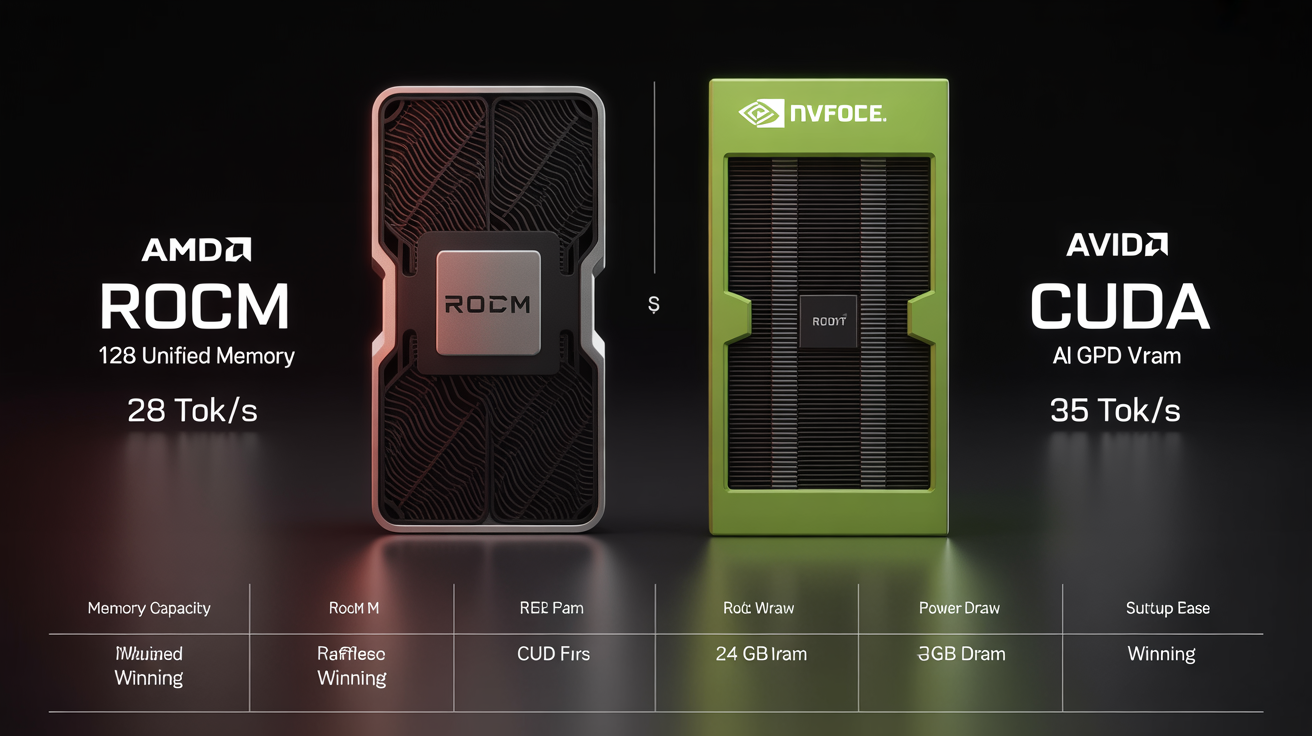
ROCm vs. CUDA: Head-to-Head for Local OpenClaw Agents (April 2026)
This is the question everyone asks. Here's the honest comparison.
| Factor | ROCm (AMD, e.g., MS-S1 Max) | CUDA (NVIDIA, e.g., RTX 4090/5090) |
|---|---|---|
| Raw tok/s (same model) | 80–90% of CUDA equivalent | Baseline (fastest) |
| Effective Memory | 128 GB unified (MS-S1 Max) | 24 GB (4090) / 32 GB (5090) |
| Max Model Size | 72B Q4 comfortably | 32B Q4 (24 GB) / 40B Q4 (32 GB) |
| Ease of Setup | Medium (ROCm quirks, GFX overrides) | Easy (mature, zero-config with Ollama) |
| Ollama Support | Good (improving rapidly) | Excellent (first-class) |
| ML Ecosystem | Smaller, catching up | Massive, dominant |
| Power Draw (whole system) | ~130W sustained | ~350–450W (GPU alone) |
| Noise | Moderate (mini-PC fans) | Loud (blower/open-air GPU) |
| System Cost | ~$3,000 (complete mini-PC) | ~$2,000 (GPU) + $800+ (rest of PC) |
| Physical Size | Mini-PC (shelf or 2U rack) | Full ATX tower |
| Upgrade Path | Add dGPU via PCIe x16 | More VRAM = new GPU |
| Future-Proofing | AMD investing heavily in ROCm | Dominant, but expensive |
When ROCm (MS-S1 Max) Wins
- You need to run 70B+ models — 128 GB unified memory is unbeatable at this price point
- You want a complete, compact system — no separate PC build, fits on a shelf
- You value low power draw — 130W vs. 350W+ saves $25+/month on electricity
- You want PCIe x16 for future discrete GPU expansion
When CUDA Still Wins
- You need absolute maximum tok/s on 27B–32B — a 4090 is 10–20% faster at same model size
- You're doing fine-tuning, not just inference — CUDA's training ecosystem is far ahead
- You need rock-solid framework compatibility — CUDA is the default target for all ML tooling
- You already own a desktop with a PCIe x16 slot — just buy an RTX 4090 (~$1,600–2,000)
Practical Advice: Adding a Discrete NVIDIA dGPU Later
The MS-S1 Max's PCIe x16 slot (electrically PCIe 4.0 x4) accepts full-length GPUs. For LLM inference — which is memory-bandwidth-bound, not PCIe-bandwidth-bound — the limited bus width is adequate.
Practical options:
- RTX 4060 Ti 16 GB (~$400): Adds 16 GB dedicated VRAM for a second model. Run your daily driver on the iGPU and a specialized model on the dGPU.
- RTX 4090 24 GB (~$1,800): Adds 24 GB of fast GDDR6X. Run 27B models at full CUDA speed on the dGPU, 70B on the iGPU via ROCm. Best of both worlds.
- Power budget: The built-in 320W PSU may not support a high-TDP dGPU. The 4060 Ti (160W) should be fine. The 4090 (450W TDP) would require an external PSU or creative power routing — check community reports before attempting.
- eGPU alternative: The USB4 v2 (80 Gbps) port can drive an external GPU enclosure. Lower bandwidth than internal PCIe but no need to open the chassis. Community testing with Thunderbolt eGPU enclosures + RTX 4070 is ongoing.
Advanced OpenClaw Config: Fallbacks, Multiple Models, Custom Base URLs
For a power user running multiple agents with different needs (example from a real deployment — replace names and IDs with your own):
{
  "agents": {
    "list": [
      {
        "id": "copilot",
        "name": "Assistant",
        "model": {
          "primary": "ollama/qwen3.5:27b",
          "fallbacks": ["openrouter/moonshot/kimi-k2.5"]
        }
      },
      {
        "id": "shop-ops",
        "name": "ShopBot",
        "model": {
          "primary": "ollama/glm-4.7-flash:9b",
          "fallbacks": ["ollama/qwen3.5:27b"]
        }
      },
      {
        "id": "coder",
        "name": "DevAgent",
        "model": {
          "primary": "ollama/qwen3-coder:32b",
          "fallbacks": ["openrouter/moonshot/kimi-k2.5"]
        }
      }
    ]
  },
  "models": {
    "mode": "merge",
    "providers": {
      "openrouter": {
        "baseUrl": "https://openrouter.ai/api/v1",
        "apiKey": "${OPENROUTER_API_KEY}",
        "api": "openai-completions",
        "models": [
          { "id": "moonshot/kimi-k2.5", "name": "Kimi K2.5" },
          { "id": "zhipu/glm-5-turbo", "name": "GLM-5 Turbo" }
        ]
      }
    }
  }
}
Config editing discipline: Always stop the OpenClaw service fully before editing openclaw.json. OpenClaw auto-discovers plugins and rewrites config on startup — edits made while running get overwritten. If graceful shutdown hangs (a known recurring issue), use systemctl kill -s SIGKILL. Always use Python's json module for programmatic config edits — never sed on JSON. Verify edits: python3 -c "import json; json.load(open('openclaw.json'))".
Schema reminder: Only id, name, and model (with primary and fallbacks) are valid keys in agent list entries. Keys like identity, tools, subagents, thinking cause validation errors. Model strings require the provider prefix (e.g., ollama/, openrouter/).
Scaling Tips
Clustering: The MS-S1 Max supports 2U rack deployment with reserved cascade power-on headers for multi-unit management. Minisforum demonstrated a four-unit cluster running DeepSeek-R1 671B Q4 (380 GB distributed). A practical two-unit cluster runs 235B Q4 models at ~10.87 tok/s. For most solo operators, one unit is plenty. Small agencies with 10+ agents can benefit from two units behind nginx or HAProxy load balancing.
Proxmox: For running OpenClaw, Ollama, and other services (n8n, monitoring, Caddy) with isolation on the same hardware, Proxmox works well. Pass the GPU through to an Ollama VM, run OpenClaw in an LXC container, keep your automation stack separate.
Sustained office use: At 130W sustained in Performance mode, the MS-S1 Max is built for 24/7 operation. Electricity at ~$0.15/kWh: ~$15–20/month in Performance mode, ~$12–15/month in Balance mode. Over 12 months, total cost of ownership is roughly $3,200 (hardware + electricity) — equivalent to about 4 months of Hetzner GEX131. The mini-PC pays for itself compared to cloud GPU rental within 6 months.
🚀 Run This Today — Level 3 Quick-Start (MS-S1 Max)
# 1. Install Ubuntu 24.04 LTS (boot from USB, wipe Windows)
# 2. After first boot:
sudo apt update && sudo apt upgrade -y
sudo apt install -y r8125-dkms   # if 10GbE NICs aren't detected

# 3. Install ROCm (see full guide above for details)
sudo apt install -y amdgpu-dkms rocm-hip-runtime rocm-smi-lib
sudo usermod -aG render,video $USER
sudo reboot

# 4. Install Ollama
curl -fsSL https://ollama.com/install.sh | sh

# 5. Configure Ollama for ROCm + always-on
sudo mkdir -p /etc/systemd/system/ollama.service.d
sudo tee /etc/systemd/system/ollama.service.d/override.conf << 'EOF'
[Service]
Environment="OLLAMA_HOST=0.0.0.0:11434"
Environment="HSA_OVERRIDE_GFX_VERSION=11.5.0"
Environment="OLLAMA_FLASH_ATTENTION=1"
Environment="OLLAMA_KEEP_ALIVE=24h"
EOF
sudo systemctl daemon-reload && sudo systemctl restart ollama

# 6. Pull models and verify ROCm acceleration
ollama pull qwen3.5:27b
OLLAMA_DEBUG=1 ollama run qwen3.5:27b "Hello"  # look for "using ROCm"

# 7. Install Tailscale for secure remote access
curl -fsSL https://tailscale.com/install.sh | sh && tailscale up

# 8. Connect OpenClaw
openclaw onboard --auth-choice ollama
openclaw doctor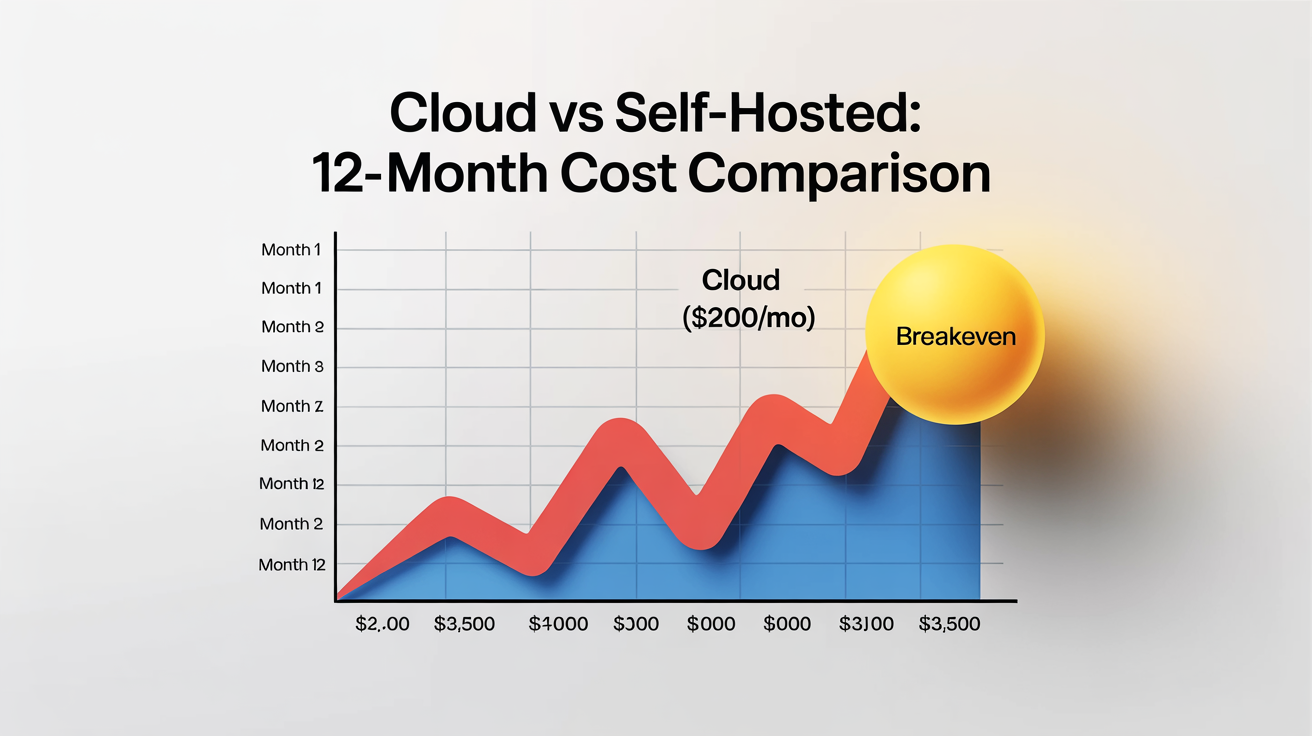
Master Comparison Table: All Migration Options Side-by-Side
| Option | Upfront Cost | Monthly Cost | Performance | Privacy | Setup Time | Hardware | Best For |
|---|---|---|---|---|---|---|---|
| Chinese Cloud Plans | $0 | $10–60 | Good–Excellent | Low (cloud) | 10 min | None | Quick migration, budget |
| Alibaba Coding Plan | $0 | $10 flat | Good (4 models) | Low (cloud) | 10 min | None | Best value multi-model |
| OpenAI Codex Pivot | $0 | $200 (sub) | Good | Low (cloud) | 15 min | None | Existing subscribers |
| Hybrid Ollama | $0 | $5–30 | Good + Excellent | High (local) | 30 min–2 hrs | PC (32 GB+) | Privacy + savings |
| Hetzner GEX44 | €79 | €212/mo | Good (32B) | Medium | 1–3 days | None | EU hosting, teams |
| Hetzner GEX131 | €79 | €838/mo | Excellent (70B) | Medium | 1–3 days | None | Heavy inference |
| MS-S1 Max 128 GB | ~$3,000–3,700* | ~$15 electric | Excellent (72B) | Maximum | 2–4 hours | Mini-PC | Power users, 24/7 |
| Budget Mini-PC 96 GB | ~$1,600–2,000* | ~$12 electric | Good (32B) | Maximum | 2–4 hours | Mini-PC | Budget local |
Advanced Tips & Gotchas (Applies to All Levels)
Tool-Calling Reliability
Not all models handle OpenClaw's tool-calling format equally. Community reliability ranking (April 2026):
- Tier 1 (production-ready): Claude Sonnet 4.6/Opus 4.6, Kimi K2.5, GLM-5 Turbo
- Tier 2 (good, occasional fumbles): qwen3.5:27b, qwen3-coder, MiniMax M2.5/M2.7, GPT-5.4
- Tier 3 (usable with retries): deepseek-r1, llama3.3:70b, smaller models (<9B)
Always test new models with openclaw doctor before production deployment.
Long-Context Best Practices
Always-on agents accumulate massive context over days and weeks. Without management, performance degrades, memory grows, and context overflows.
- Use OpenClaw's context compaction — but populate CHAT.md and CHAT-MEMORY.md stubs first. Auto-compaction on empty stubs destroys agent memory. This is the #1 cause of agent amnesia in the community.
- Set explicit context limits per agent based on your model's window and available memory.
- Weekly clean restarts for non-critical agents prevent context cruft accumulation.
- Session file bloat: OpenClaw's sessions.json can grow from
:run:entries andskillsSnapshotfields. Automate cleanup (strip these fields via Python) on a daily cron + hourly watchdog if the file exceeds 5 MB.
Security: Isolated Environments
- Never expose Ollama port 11434 to the public internet. Use Tailscale, WireGuard, or SSH tunneling exclusively. Ollama has no built-in authentication.
- Firewall discipline: On any server, use
ufwto deny all incoming except Tailscale and SSH. On mini-PCs, enable the OS firewall even behind a NAT — misconfigured routers and IPv6 can expose ports. - User isolation: Run OpenClaw as a dedicated service user (not root). Create a
clawdbotuser, install under that user, and run via systemd withUser=clawdbot. This limits blast radius. - File ownership discipline: Avoid editing agent workspace files as root when the service runs as
clawdbot. Ownership conflicts between users are a known recurring issue that causes permission errors during agent operations.
Monitoring & Maintenance
# GPU status (ROCm)
rocm-smi

# GPU status (CUDA/Hetzner)
nvidia-smi

# Loaded models and memory
ollama ps

# OpenClaw agent status
openclaw status

# Full health check
openclaw doctor

# Switch model on the fly (no restart)
openclaw models set ollama/qwen3-coder:32b

# Switch only one agent
openclaw models set --agent copilot openrouter/moonshot/kimi-k2.5
For 24/7 deployments: Set a cron job to check agent health every 15 minutes and alert you (Telegram, email, or OpenClaw's own notification chat) if something fails. Monitor disk space — model downloads and logs can fill storage quietly.
Testing a new model before switching (recommended workflow):
# 1. Pull the new model without changing your config
ollama pull qwen3.5:32b-new-variant

# 2. Test it in isolation — run a few real tasks manually
openclaw chat --model ollama/qwen3.5:32b-new-variant "Summarize my last 3 emails"
openclaw chat --model ollama/qwen3.5:32b-new-variant "Create a calendar event for tomorrow at 3pm"

# 3. Check tool-calling works
openclaw doctor --model ollama/qwen3.5:32b-new-variant

# 4. If it passes, switch one non-critical agent first
openclaw models set --agent shop-ops ollama/qwen3.5:32b-new-variant

# 5. Monitor for a day. If good, switch the rest.
# If bad, roll back instantly:
openclaw models set --agent shop-ops ollama/qwen3.5:27b
Never switch all agents to an untested model simultaneously. Roll out one agent at a time, monitor, then proceed.
Community Resources
The OpenClaw community has mobilized fast since April 4:
- Reddit: r/openclaw — active migration threads, benchmark comparisons, troubleshooting
- GitHub: github.com/openclaw/openclaw — Issues, Discussions, release notes (the April 2026 release notes are essential reading)
- Discord: OpenClaw Discord server — real-time help, model recommendations
- X/Twitter: #openclaw — migration stories, provider comparisons. Notable threads from @heyshrutimishra (Alibaba Coding Plan breakdown), @bcherny (Anthropic's official position)
- Chinese community: Zhihu, WeChat, Bilibili for Mandarin-language tutorials. The Chinese developer ecosystem around OpenClaw has been the most active in the world since March 2026.
- ClaHub: Skills marketplace — community-contributed provider integrations (e.g.,
npx clawhub@latest install openclaw-aisa-leading-chinese-llm) - pricepertoken.com: Community-voted model rankings for OpenClaw, updated daily
Future-Proofing
- eGPU expansion: The MS-S1 Max's USB4 v2 (80 Gbps) can drive an external GPU enclosure. Community testing of Thunderbolt eGPU + RTX 4070 is ongoing. Internal PCIe x16 remains the better option if you're willing to open the chassis.
- Upcoming models: The SLM (small language model) trend works in your favor. Qwen3.5:27b today approximates GPT-4 from 2023 in practical tasks. By H2 2026, expect 14B–27B models rivaling today's 70B in quality. Your hardware investment gets more valuable over time, not less.
- NVIDIA next-gen: RTX 50-series may bring 32+ GB VRAM to ~$1,500. If that happens, CUDA becomes more attractive for users who don't need 70B+ models.
- ROCm roadmap: AMD ships quarterly updates. Each release improves Strix Halo support. By ROCm 7.4/8.0, the GFX version override should be unnecessary and the performance gap to CUDA should narrow further.
- OpenClaw itself: The project is now backed by OpenAI (post-Steinberger hire) and maintained by an active open-source community. Provider integrations ship monthly. The platform is more resilient than any single model provider.
Final Recommendations & Next Steps
Personalized Decision Flowchart
"I just need my agents back, right now."
→ Run openclaw onboard, pick Kimi K2.5 or Alibaba Coding Plan. Done in 10 minutes. Cost: $10/month.
"I want to save money and I have a decent computer (32 GB+ RAM)."
→ Install Ollama, pull qwen3.5:27b, onboard with --auth-choice ollama. Set a cloud fallback for heavy tasks. Cost: $5–30/month.
"I'm running serious multi-agent infrastructure and I never want vendor lock-in again."
→ Buy a Minisforum MS-S1 Max (128 GB). Install Ubuntu, set up ROCm, run Ollama. Monthly cost is electricity. Budget: ~$3,000–3,700 one-time.
"I just want the cheapest possible option that actually works."
→ Alibaba Coding Plan: $10/month, four frontier models, 18,000 requests. Set it up in 5 minutes.
My Top Pick for Most People Right Now
Start with Level 1 today — it takes 10 minutes and costs nothing upfront. Then build toward Level 2 (hybrid) this week as you get comfortable with Ollama. If you're a power user who's been burned by vendor lock-in, the Minisforum MS-S1 Max is the standout hardware choice at this price point. 128 GB unified memory running 70B+ models locally — performance that required a $10,000+ workstation two years ago.
Call to Action
- Right now: Run
openclaw onboardand pick a new provider. Get your agents back online. - This week: Set up Ollama on your best machine. Test hybrid mode. See how much you save.
- This month: If you're serious about local AI, order your hardware. MS-S1 Max stock is limited.
- Share your story: Post your migration with #openclaw. Every guide, benchmark, and tip helps the next person who wakes up to a dead setup.
The vendor lock-in era is over. The model-agnostic era is here.
# The fastest way to get back online
openclaw onboard
# Follow the prompts — pick your provider, set your model, go.
🦞
Last updated: April 7, 2026. Prices and model availability change frequently — always check provider sites for current rates. Community benchmarks are representative, not guarantees — results vary by configuration, quantization, and model version. This guide is not affiliated with Anthropic, OpenAI, Minisforum, Hetzner, or any provider mentioned. The author runs a multi-agent OpenClaw deployment on Hetzner VPS and has evaluated all options discussed firsthand.